Grading student exercises with Insight
GetSet Insight helps you grade students based on their usage of GetSet. On Insight, you'll see which exercises students have completed and what they wrote in their responses. Use this information to assign grades in Blackboard.
1. Access GetSet Insight by clicking the GetSet Grading link in your Blackboard course. Note: this is different from the GetSet link that your students use. The GetSet Grading link is built separately.
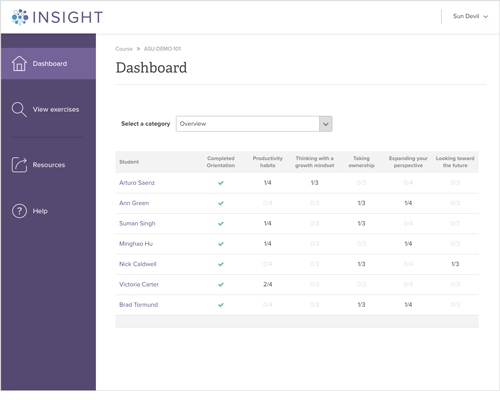
2. Use the Dashboard for a quick and easy way to see which exercises your students have completed. Only students who have started GetSet's Orientation will be displayed in the list.
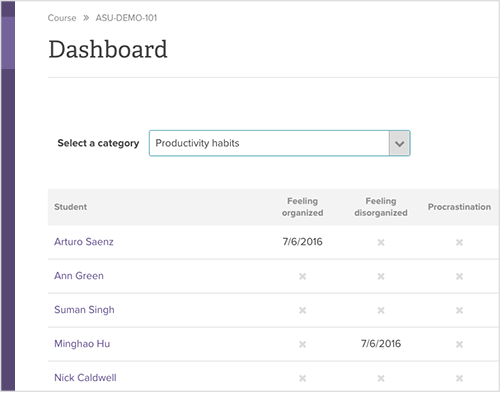
3. Narrow your view down to a specific category by selecting it in the drop down menu. In this view, you'll see the date each exercise was completed.
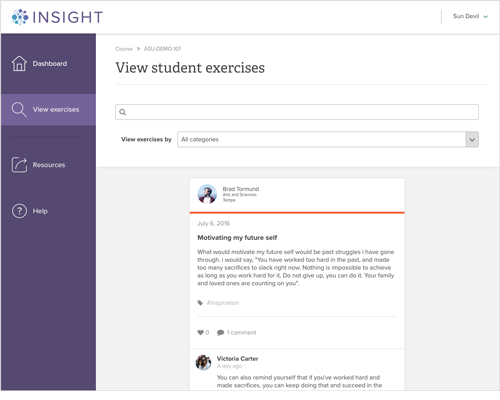
4. Select "View exercises" to see what students wrote in their exercises. You can search or filter by exercise category.