
FAQ for Miskatonic University
Blackboard
About GetSet
- What is GetSet?
- Where can I learn more about growth mindset?
- How do my students access GetSet?
- What will a student see in GetSet?
- Where can I find tools and resources related to GetSet?
- Why would a student use GetSet over a school forum?
Help
- How can I leave feedback?
- Where should I go for help with GetSet?
- Nothing happens when I click the GetSet link in Blackboard. What should I do?
Remind me
Those having technical issues with Blackboard should submit a Service Now ticket. You can do so by going to your MyASU and clicking the Service Center tab. Then, you can either search for an article on the issue or submit a new case.
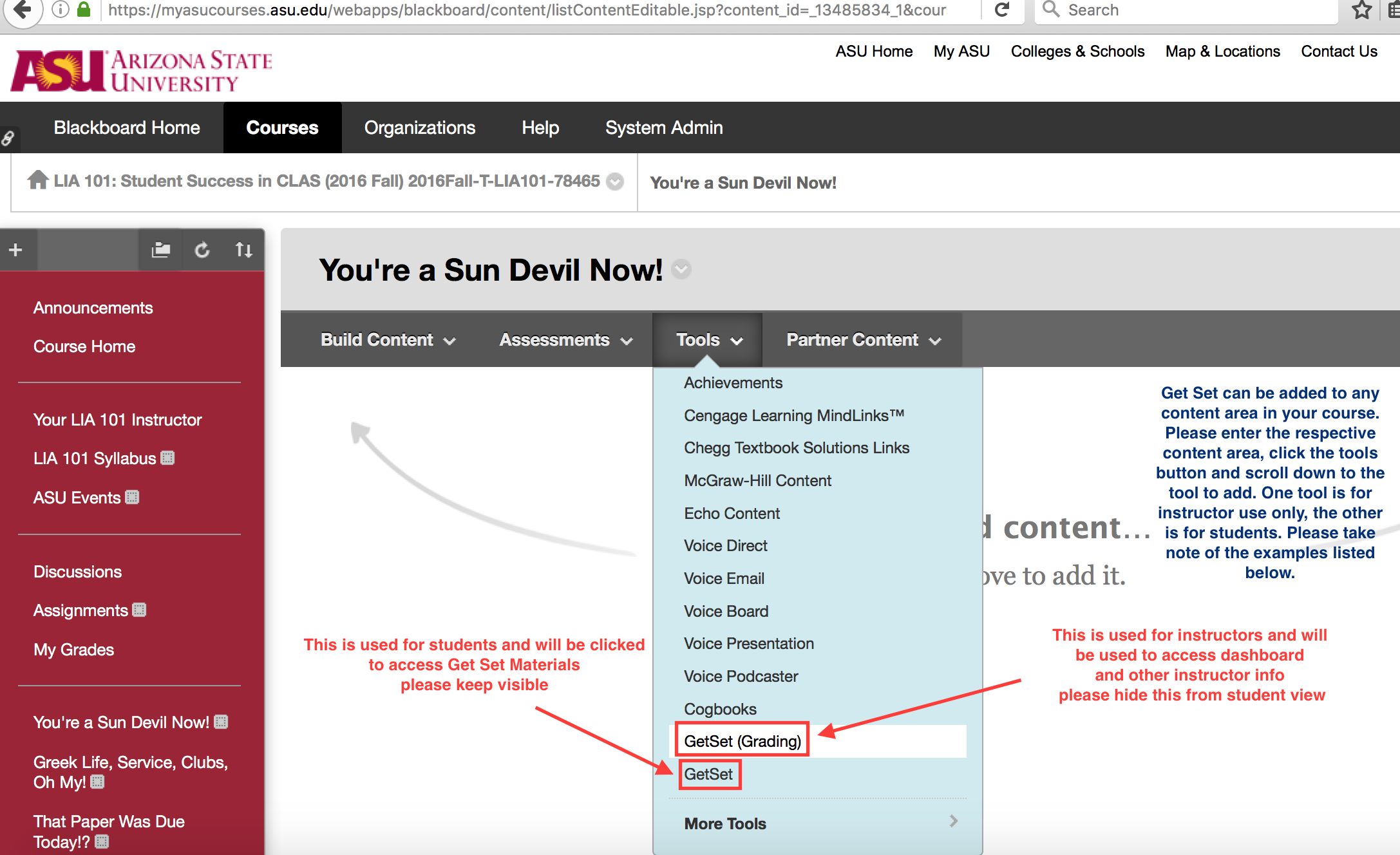
GetSet can be added to any content area in your course. From the Tools menu, you will need to first add "GetSet" for your students, and then "GetSet (Grading)" for yourself.
The "GetSet" link is used by students to access GetSet. Please keep it visible.
The "GetSet (Grading)" link is used by instructors to access Insight, GetSet's dashboard tool. Keep this hidden from student view.
GetSet is an online community for ASU students to share stories about the successes and challenges of being in school. Students can trade tips, advice, and motivation.
GetSet is also used as a tool in ASU 101 courses. Students can complete a series of exercises as assigned by their instructor.
Visit about.getset.com/growth-mindset to learn more about growth mindset. You can also read some of the research for yourself here, here, and here.
The first time they access GetSet, students click the GetSet student link in their Blackboard course. This will launch GetSet's Orientation and connect them to the Blackboard course so you can see their data in GetSet Insight.
Students can return to GetSet any time via the link in their Blackboard course. You can also log in at asu.getset.com or download GetSet for iOS or Android.
GetSet begins with a short "Orientation", in which students will learn about growth mindset and the benefits of applying it to their scholastic lives. They'll also read stories from their classmates and then post their first story to GetSet.
After completing GetSet's Orientation, students will have full access to GetSet, where they can complete assigned reflection exercises; browse their classmates' stories, tips, and advice; and share advice, questions, and motivation with their fellow ASU students.
To learn more about what students can do on GetSet, check out our student experience guide.
Throughout this website, you'll see many opportunities to download tools that may help you implement GetSet in the best possible way. Each page is available as a downloadable PDF. You can also download these resources:
- GetSet exercise catalog
- GetSet Insight grading guide
- GetSet discussion guide
- In-class activity: Peer critique
- In-class activity: Lessons learned
- GetSet student instructions
You can also click here to download all of them in one toolkit.
The GetSet student community is unique in that it is a safe space for students only. Instructors don't have the ability to create accounts or leave comments, so students feel safe in knowing that they can freely discuss their challenges in an environment where others will know what they're going through.
In GetSet's Orientation, we make it clear that discussions on the site involve overcoming challenges, so students approach writing new posts with the mindset that they should be contributing to that conversation. This helps to further differentiate GetSet from a traditional social media site.
We love hearing your feedback because it helps us improve. Click here to tell us what's on your mind.
GetSet for students and GetSet Insight for grading both open in new browser windows or tabs. If nothing happens when you click the link, a pop-up blocker may be preventing GetSet from opening. Disable your pop-up blocker or allow pop-ups from Blackboard, and then try again.
If you or your students are still having trouble, please submit a help request and we'll work with you to solve the problem.
We've broken everything down for you in our section on implementing GetSet in your classroom.
On GetSet Insight, our tool for instructors, you'll be able to view which exercises students have completed and what they wrote. Use Insight to evaluate student responses and then assign grades in Blackboard.
To access Insight, click the GetSet Grading link in your Blackboard course. To see how to use Insight, check out our user guide here.